Have you ever been on a website, ready to buy something, but your gut suddenly tells you something is off?
Maybe the price seems too good to be true. Maybe the website looks a little strange. Or maybe everything appears completely normal, but you still hesitate before entering your credit card details. We’ve all been there.
The truth is, the internet feels a little broken right now. Even smart, careful people are getting tricked by fake websites that look almost identical to the real thing. The old advice of “just look for spelling mistakes” doesn’t really work anymore because scammers have become a lot more sophisticated.
I’ve been looking for a way to stop second-guessing every click, and that’s why I want to introduce you to Nudge. It’s a free browser extension that acts like a trust layer for the internet, helping you quickly understand whether a website deserves your confidence before you engage with it.
Why “Trusting Your Gut” Just Isn’t Enough Anymore
The reality is that scammers have gotten incredibly good at what they do.
Today, creating a fake website is easier than ever. A convincing copy of a popular store, bank, or service can be put together in a matter of minutes. To the average person, it can be almost impossible to tell the difference.
Then there are those ads we all see while scrolling through social media. You know the ones. They show some amazing gadget or unbelievably cheap deal that seems impossible to ignore.
Sometimes those stores are legitimate.
But sometimes they aren’t. People place orders, enter payment details, and then discover the store disappears without a trace.
The biggest problem is the mental exhaustion. We shouldn’t have to play detective every single time we want to read an article, shop online, or click a link someone shared with us.
The internet was supposed to make life easier, not turn every browsing session into an investigation.
Meet Nudge: Your Internet Bodyguard
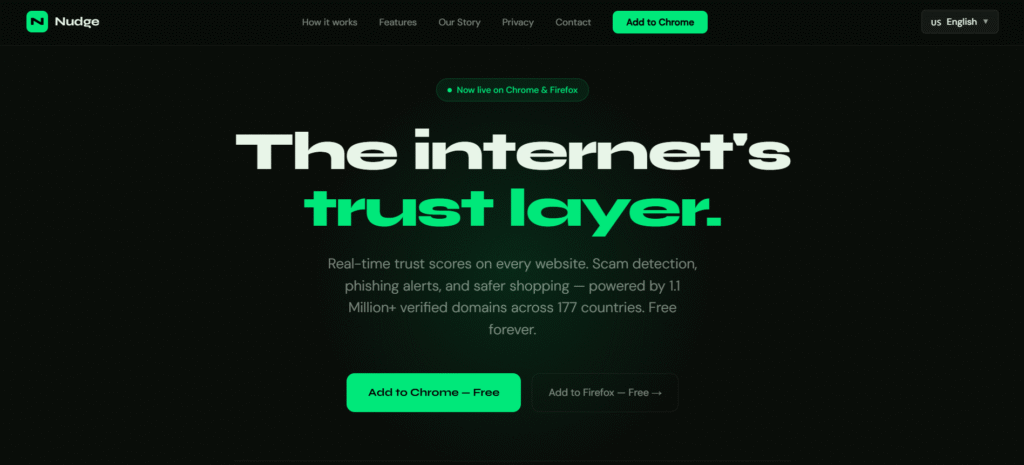
This is where Nudge comes in.
Think of Nudge like a digital bodyguard that sits quietly in your browser. While you browse the web, it helps evaluate the websites you’re visiting and gives you a simple signal about whether they’re trustworthy.
Instead of spending your time researching every unfamiliar website, Nudge helps you make faster and more informed decisions.
What I like most is that it doesn’t require any technical knowledge. You don’t need to be a cybersecurity expert. You simply install it and let it work in the background while you browse normally.
Even better, it’s completely free to use.
How It Actually Works (The Cool Features)
Green Means Go
When you land on a website, Nudge gives you a simple visual signal that’s easy to understand.
- Green means the site has been verified and appears trustworthy.
- Red means you should be extremely cautious and leave immediately.
- The goal is simple: help you make safer decisions in seconds.
No complicated reports. No confusing security warnings. Just a clear signal you can understand at a glance.
Safe Searching
Nudge helps before you even visit a website.
- Trust indicators can appear alongside search results.
- You get an extra layer of confidence before clicking.
- Potentially risky sites become easier to spot.
That means fewer surprises and fewer chances of ending up somewhere you never wanted to be.
Inbox Protection
Let’s be honest.
We’ve all received those suspicious emails claiming our account has been locked, our payment failed, or we’ve won some random prize.
Nudge helps by checking links and giving you additional context before you click.
- Helps identify suspicious links.
- Adds an extra layer of protection against phishing attempts.
- Reduces the chances of accidentally landing on a fake website.
Sometimes one extra warning is all it takes to avoid a major headache.
Security That Doesn’t Spy on You
If you’re anything like me, you probably don’t want another company tracking everything you do online.
That’s one of the biggest concerns people have with browser extensions. Many users worry that the tool protecting them could end up collecting their browsing activity instead.
That’s why privacy matters.
Nudge is designed to focus on helping you evaluate websites while maintaining strong privacy standards. The goal is simple: provide safety and trust signals without turning your personal browsing habits into a product.
In a world where it feels like every app wants more data from us, that approach is refreshing.
Why I Think Every Internet User Needs Something Like This
The internet has become an essential part of everyday life.
We shop online. We bank online. We work online. We communicate online.
Yet most of us still rely on instinct when deciding whether a website can be trusted.
That doesn’t make much sense anymore.
We wear seatbelts when we drive. We lock our doors when we leave home. We install antivirus software on our computers.
Adding a trust layer to your browser feels like the next logical step.
It’s not about being paranoid.
It’s about making safer decisions without adding extra effort to your day.
Let’s Browse With Peace of Mind
The internet should be useful, exciting, and enjoyable.
It shouldn’t leave us constantly wondering whether the next click is going to lead to a scam, a fake store, or a phishing page.
That’s why tools like Nudge are becoming so important. They help restore something that’s been missing online for a long time: trust.
You lock your front door at night to stay safe. It’s time to do the same for your browser.
Nudge takes only a few moments to install, and it’s completely free.
Download Nudge today and start browsing with greater confidence and peace
Leave a Reply